
How to enable voice message transcription in Kommo with AnyLinga
Need to transcribe WhatsApp or Telegram voice messages right in Kommo? AnyLinga converts incoming audio to text and translates it into the manager's language.
Replies have a separate setting: the manager records a voice message in Kommo, and the client receives translated text instead of audio.
What you'll need
- Kommo connected: connection instructions.
- Any paid plan or an active 7-day trial.
- Voice messages from WhatsApp or Telegram.
- Credits to transcribe client and manager voice messages, and to translate them if needed.
How to enable incoming voice message transcription
1. Open automation settings
- In the sidebar, select Automation → Automation.
- Go to the Automations tab.
2. Enable voice transcription
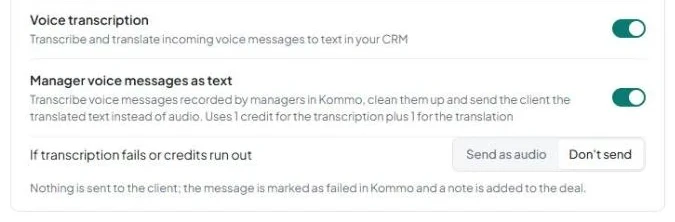
- Turn on Voice transcription.
- This setting converts incoming voice messages to text with translation in your CRM.
What the manager sees in Kommo
The client's voice message arrives in Kommo as audio, as usual. AnyLinga then transcribes it and translates the text into the manager's language using the same rules as for a regular text message: how translation works.
The result arrives in the same chat as a separate text message from the same client. If the languages match or translation is off, the transcript arrives without translation.
If the credit balance is zero, the incoming voice message is not transcribed: the audio stays in Kommo as usual. A system message appears in the chat: “[AnyLinga] Translation not performed: translation credits have run out. Messages are delivered in the original language. Top up in AnyLinga → Billing.” It appears no more than once per hour per chat.
The transcript also helps identify the client's language and appears in AnyLinga: card widget.
3. View the transcript in the chat
- Open the chat with the incoming voice message in Kommo.
- Read the transcript below the audio: if it was translated, the text will be in the manager's language.
How to send manager voice messages as text
4. Enable manager voice messages as text
- On the same Automations tab, turn on Manager voice messages as text.
- Record a voice message in Kommo. AnyLinga will transcribe it, make the text readable, translate it, and send the client text instead of audio.
5. Choose what happens if an error occurs
- Under If transcription fails or credits run out, select the appropriate option.
- Send as audio — the client receives the original audio without translation.
- Don't send — the client receives nothing. The message in Kommo is marked with an error, and a note appears in the lead.
Plans and credit usage
Voice transcription is available on any paid plan and during the 7-day trial. Plans differ in campaign and Inbox capabilities, not in transcription availability. Learn more: plans.
Transcribing an incoming voice message of any length costs 1 credit. Translating the resulting text costs 1 additional credit, only if it is translated. If the languages match or translation is off, only 1 credit is used for transcription. If transcription fails, no credits are deducted.
A manager voice message sent to the client as text uses 1 credit for transcription and 1 credit for translation if it is translated. Learn more: translation credits.
You can view credit usage by type and day in your account: Monitoring → Credit usage.
Get in touch
We reply during business hours.
New to AnyLinga?
Try it yourself, or we'll set it up for you when you pay for the first month.