AnyLinga
EN
Log in Try it free

AnyLinga Connect · AI agents for Kommo

Give your AI agent the context to answer well

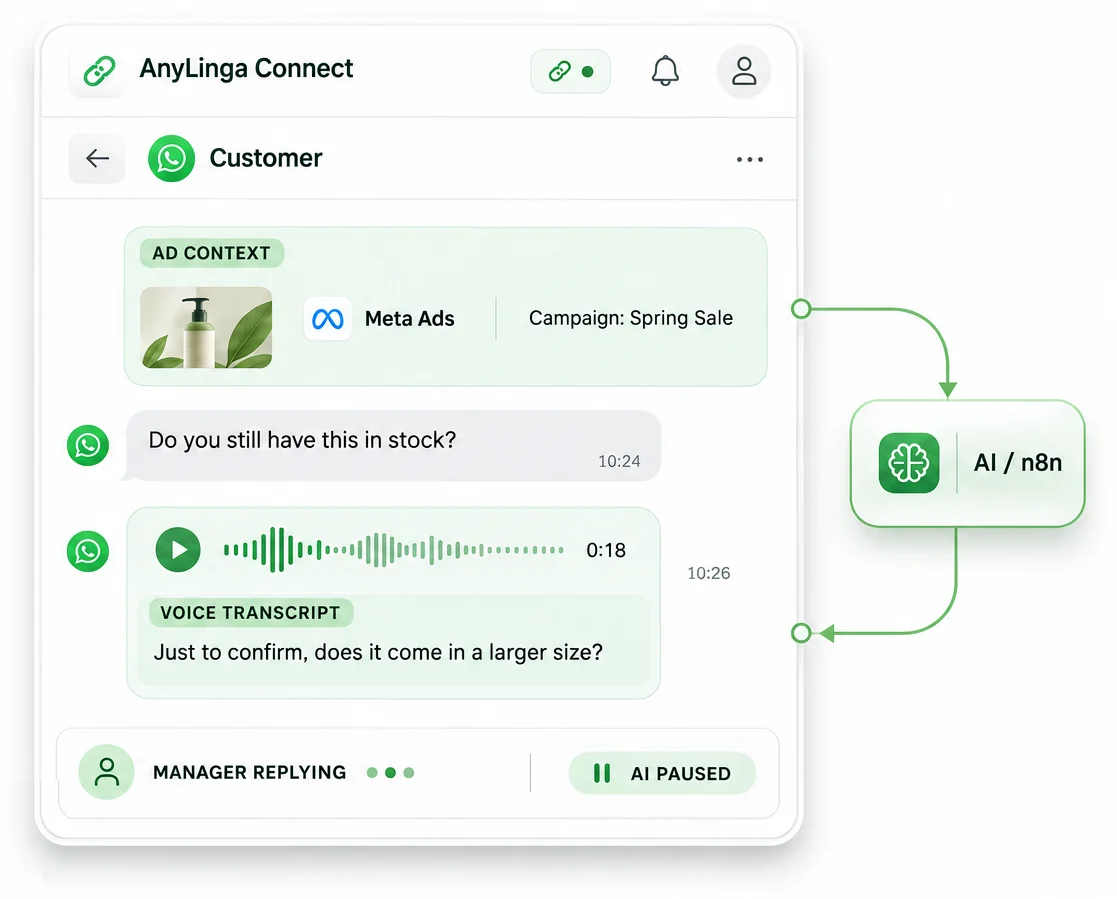
Connect your n8n AI agent to Kommo chats. AnyLinga passes along Meta ad context, audio transcripts and signals when a manager joins the conversation — then delivers your agent’s reply back to the customer.

Your AI. Your prompts. Your rules.

WhatsAppInstagramTelegramFacebook Messengerand more
Give your AI agent the context to answer well

Three things your AI shouldn’t have to guess

01
“How much does it cost?”

Which offer?

A customer replies to a Meta ad with a short question. AnyLinga passes the ad details along with the message, so your agent can see which campaign or offer the customer is referring to.

02
0:08 A voice message

What did they say?

With voice transcription turned on, AnyLinga sends the audio transcription to your agent. It can understand the customer’s message and respond without a separate speech-to-text step in your n8n workflow.

03
A manager joins

Should AI keep replying?

When a manager starts communicating with the customer in Kommo, AnyLinga can send that signal to your workflow. Your agent can pause or hand the conversation over, avoiding unwanted interruptions and double replies.

How AnyLinga Connect works

01

The customer writes

A customer messages your WhatsApp, Instagram, Telegram or another connected channel.

02

AnyLinga adds the context

AnyLinga sends the message and available context to your n8n webhook.

03

Your n8n agent responds

Your workflow processes it with your AI agent.

04

AnyLinga delivers the reply

AnyLinga returns the reply to the same chat and adds it to the Kommo conversation.

The conversation stays in Kommo. Your agent handles the response logic; AnyLinga handles the connection to the chat.

Your agent, your way

Connect an n8n workflow with the model, prompts, tools and business rules you choose. AnyLinga passes messages between the connected chat and your workflow; you decide how the agent responds.

  • Use your own AI model and prompts.
  • Add your business logic and tools in n8n.
  • Choose when the agent should respond.
  • Pass the conversation to a manager when needed.
  • Optionally translate messages for multilingual conversations.

Set it up with your n8n workflow

1

Connect your channels

Connect AnyLinga to Kommo and add the messaging channels your customers use.

2

Import the n8n template

Download the starter workflow, import it into n8n and copy its HTTPS webhook URL.

3

Configure the gateway

Add your webhook URL in AnyLinga. Set up the callback and signature verification so the workflow can return replies securely.

4

Test a real conversation

Send a test message and check that your workflow receives it and the reply appears in the customer’s chat and Kommo.

Read the setup guide

Built for real conversations

Meta ad context

Give your agent the ad details it needs to understand what the customer is asking about.

Audio transcription

Send the transcript to your agent so voice messages don’t become a blind spot.

Human activity signal

Let your workflow know when a Kommo manager has started replying.

Callback replies

Return the answer with a callback request — it works for longer-running workflows too.

Conversation context

Pass available conversation and contact identifiers to your workflow.

Multilingual messaging

Optionally translate customer messages and agent replies through AnyLinga.

Requirements

  • An active AnyLinga account.
  • The messaging channels you want to use, connected to AnyLinga.
  • An n8n workflow with an HTTPS webhook.
  • A connected Kommo account for Kommo conversations and deal-based filters.
$21

AnyLinga Connect is available on all AnyLinga plans. Channel connections cost $21 per channel per month, with no per-employee charge.

Connect your AI agent

Questions builders ask

Open the full setup guide
Does AnyLinga generate the AI replies?

No. Your n8n workflow and AI agent generate the replies. AnyLinga passes messages and available context between the chat and your workflow.

Can the agent understand Meta ad replies like “How much?”

Yes. AnyLinga can pass Meta ad details with the message, so your workflow can give the agent the campaign or offer context.

What happens when a customer sends a voice message?

With voice transcription turned on, AnyLinga sends the transcription to your agent, so the workflow can process the message as text.

Can the agent stop when a manager takes over?

AnyLinga can notify your workflow when a manager starts communicating in Kommo. You decide whether the agent pauses or hands the conversation to a person.

Do I need to build the workflow from scratch?

No. Start with the AnyLinga n8n template, then customize it for your agent and business process.

Which channels can I use?

Any messaging channel connected to AnyLinga, including WhatsApp, Instagram, Telegram and Facebook Messenger.

Where can I find the technical setup?

See the step-by-step guide for webhook configuration, callback replies, signature verification and testing.

Let your AI see the whole conversation

Connect your n8n agent to Kommo chats with the context it needs — and give your team a clear handoff when a manager steps in.